


Univision Now: Live TV
3.610.38K Reviews
App Specs
- Version
- Varies with Device
- Updated On
- License
- Free
- Downloads
- 5,000,000+
- Developer
- Univision Communications Inc.
- Categories
- Entertainment
- Platform
- Android
Screenshots
 Analysis by AppCompare
My view of a live-TV app starts with a simple question: what happens when the network connection changes? With Univision Now: Live TV, that matters because watching a scheduled broadcast and choosing an episode from a library are different kinds of viewing. One asks you to tune in at the right moment; the other gives you more control over when to press play. I find the app most useful when I plan around that distinction instead of treating every video as equally convenient.
When a live stream fits the moment
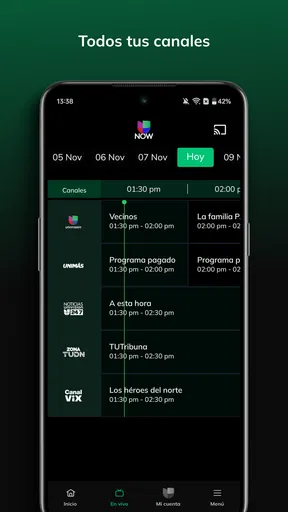
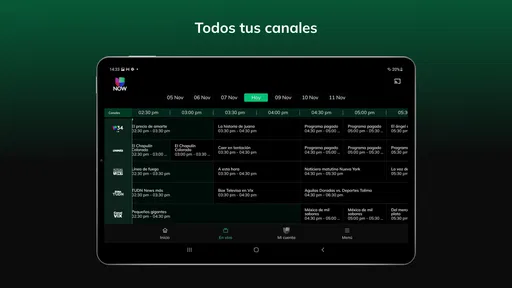
Live viewing has a particular appeal for news, sports and programs people discuss as they air. Univision and UniMás give the app a clear identity: it is aimed at viewers who want Spanish-language television from those networks, not a broad collection of channels from every broadcaster. For a match or a major news event, watching in real time can feel more involving than catching highlights later, but it also ties the experience to both the broadcast schedule and a dependable connection.
That trade-off is worth considering before you settle in. If the stream pauses during a key moment, the interruption is more noticeable than it would be while browsing a familiar episode. I would use a stable Wi-Fi connection for an event I particularly care about, and keep mobile viewing for situations where a brief interruption would not ruin the experience. The app is at its best when the connection is strong enough that I can focus on the program rather than monitor the loading.
Watching around a mobile day
The app makes sense for a commute, a lunch break or a quiet stretch between errands, provided the connection is suitable. On-demand viewing is naturally easier to fit into an unpredictable day than a live program: you can choose something when you have time, rather than arranging your time around the broadcast. If I know I only have a short break, I would pick a program with a clear stopping point instead of starting a live event that may continue after I need to leave.
There is also a practical difference between watching on a phone and watching on a shared television. A phone is convenient when one person wants to catch up without taking over the living room, while a larger screen suits an evening when everyone wants to watch together. The original article describes Chromecast support and device syncing, but I would still check that the devices and connection are ready before a live broadcast begins. A few minutes of setup are easier to handle before the program starts than during it.
What to do when playback falters
Streaming quality depends on the connection, so a slowdown can show up as buffering or a less steady picture. If playback struggles, I would first check whether other apps or devices are using the same network heavily, then try moving to a more reliable connection if one is available. For mobile data, changing location can matter too: a stronger signal is often more useful than repeatedly restarting the same stream from the same spot.
It helps to distinguish a problem with one session from a problem with the app itself. If a live stream falters but another video plays normally, the issue may be tied to that moment or connection. If nothing loads, closing and reopening the app is a reasonable first step, followed by checking the connection. These are ordinary troubleshooting steps, not a guarantee that every interruption can be fixed; for an event where missing minutes matters, I would have another way to follow the news or score available.
Worth Reading Before You Choose

EA SPORTS FC Mobile 26 Is a Bigger Football Game, but It Takes Time

Flipboard Shows What News Apps Must Do Beyond the Feed

Switching to Android Auto Means Rethinking Your Driving Routine

Google Calendar Makes a Crowded Week Easier to Manage

Ludo King Makes the Most of the Minutes Between Plans

Baby Panda World Brings Quick Play to Modern Phones, but Its Game Library Feels Busy
Choosing a sensible data routine
Video can use a noticeable amount of mobile data, so I would avoid assuming that a long viewing session is harmless to a limited plan. When I have Wi-Fi, that is my first choice for extended episodes or live coverage. If I need to watch over cellular, I keep the session intentional: choose the program first, avoid leaving a stream running when I am no longer watching, and pay attention to any data limits on my own plan.
This is also where the app’s two viewing modes can help with planning. A live broadcast is useful when timing is the point; on-demand is more convenient when I want to decide how long to watch. The choice does not remove the need for a connection, but it can prevent me from opening a stream at a bad time and then feeling rushed. For viewers who frequently watch away from home, that small bit of planning can make the experience less frustrating.
First Impressions
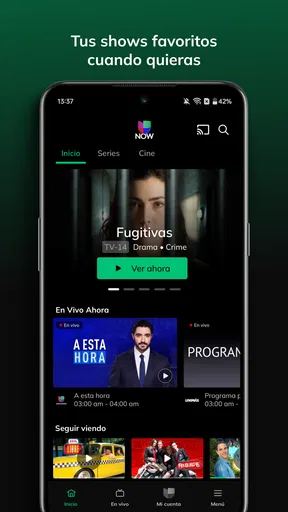
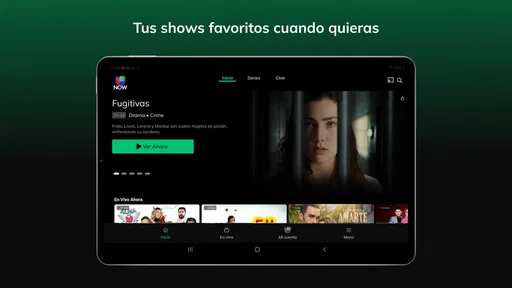
Right off the bat, Univision Now: Live TV greets you with a clean and intuitive interface. No messing around—just straight to the point. It’s designed to give you quick access to live TV and a vast library of on-demand content. The navigation is smooth, and everything is right where you’d expect it to be. This is key if you’re looking to binge on your favorite telenovelas or catch up on the latest news.
The Content Galore
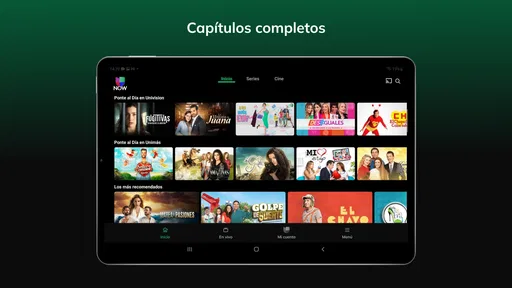
If you’re a fan of Spanish-language programming, this app is like a candy store. You get access to live streams of Univision and UniMás channels. That means you can watch the latest episodes of popular shows like “El Gordo y La Flaca” or follow the gripping drama in “La Rosa de Guadalupe.” Not to mention, the sports coverage is pretty robust, with soccer matches and more. For news junkies, the app delivers timely updates and live coverage of major events, keeping you in the loop at all times.
This focused lineup is also a useful way to decide whether the app is for you. If the people in your household already follow these networks, it can put familiar shows, news and sport in one place. If you mainly want international channels from many different providers, or a large general-purpose video catalogue, a broader streaming service may suit you better. I would treat this as a destination for Univision and UniMás viewing rather than a replacement for every kind of television.
On-Demand Features
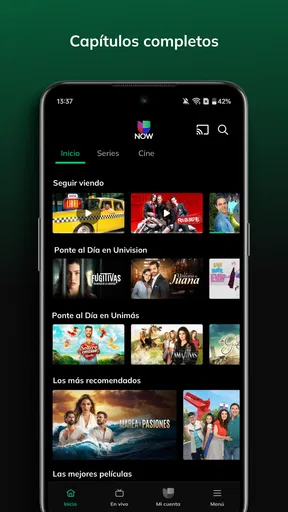
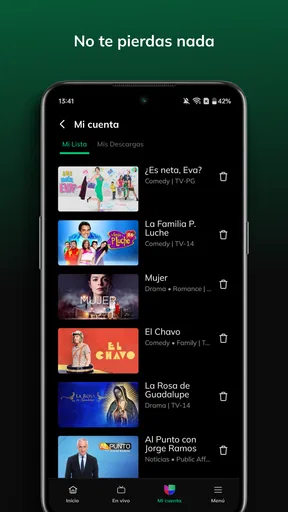
The on-demand library is another highlight. It’s packed with past episodes, special features, and even some exclusive content. It’s perfect for those moments when you miss an episode or want to revisit a favorite scene. The search function makes finding content a breeze, and you can even create your own list of favorites to keep track of what you love most.
For a practical routine, I would use search when I already know the program I want, then use the favorites list as a simple reminder of what to return to. That can be more efficient than scrolling through options during a short break. On-demand is especially handy if someone else in the household is watching the television: you can choose a program on your own device and watch when it suits you, subject to the connection holding up.
User Experience
Let's talk about the user experience. The app runs smoothly, and I didn’t encounter any major glitches or hiccups. The streaming quality is solid, offering HD options when available. A good Wi-Fi connection is your best friend here, but even on mobile data, the app performs admirably.
In day-to-day use, I would not judge a live stream solely by how quickly the app opens. The useful test is whether playback stays steady in the place and at the time I actually watch. A home Wi-Fi network may feel reliable in one room and less so elsewhere, while mobile reception can change as you move. If a program matters, starting playback a little before settling in gives you a chance to sort out a connection issue without missing the opening.
The published average rating is 3.5 from around 32,000 ratings, alongside roughly 10,000 written reviews. I read that as a reminder to weigh the app against my own needs, not as a promise that every setup will behave the same way. A viewer who mainly wants these networks may value the focused access; someone expecting flawless streaming on any connection may be less satisfied.
Accessibility and Compatibility
One of the things I appreciate about Univision Now is its accessibility. The app is available on both Android and iOS, and it even supports Chromecast, which is perfect if you want to transition from your phone to the big screen. Setting it up on different devices was straightforward, and everything synced seamlessly between my tablet and smartphone.
That flexibility is useful, but I would think about the viewing setup before an important live program. Casting adds a second device and a wireless connection to the chain, so if something does not appear on the television, it is worth checking both the phone’s connection and the receiving device rather than assuming the stream itself is broken. For a casual episode, troubleshooting is no big deal; for a match already underway, watching directly on the phone may be the simpler fallback.
Subscription Details
Now, let’s get into the nitty-gritty. Univision Now offers a subscription-based model. While some content is available for free, the full experience—live TV and the entire on-demand library—requires a monthly subscription. It’s a reasonable price for the amount of content you’re getting, especially if you’re a fan of Univision’s programming.
The app is free to install, but in-app purchases range from $4.99 to $194.99 per item, so I would check the purchase screen carefully before committing. The exact choice matters more than the word “free”: decide whether you expect to watch often enough to justify paying, and confirm what a selected purchase covers before proceeding. If you only want occasional clips or already watch these networks another way, a paid option may not add enough value for you.
Univision Communications Inc. develops the app, which is categorized as entertainment. It has more than 5 million installs, is rated Teen, and was released on November 17, 2015. Android users need version 6.0 or later. Those details help set expectations about its audience and device compatibility, but the most important personal test remains whether its particular channels and programs match what you actually watch.
Who will get the most from it
I would recommend it first to someone who regularly follows Univision or UniMás and wants the choice between tuning in live and catching up later. A Spanish-speaking household could also find it convenient when people want familiar network programming without having to share one screen at the same time. It is less compelling for a viewer who rarely watches Spanish-language television, needs a wide mix of unrelated channels, or has a connection that cannot reliably handle video.
Think of a realistic evening: you are cooking, want to keep up with a news program, and do not want to sit in front of the television. A phone can make that possible while you move around the home, but a weak signal in the kitchen can turn a useful companion into an interruption. I would test the connection in the places where I expect to watch, then choose Wi-Fi or a larger-screen setup accordingly. That simple check tells you more about everyday suitability than a quick launch on a strong network.
Where it sits among alternatives
Compared with general on-demand services, this app’s strength is its direct connection to two Spanish-language broadcast networks and the option of live viewing. A broad streaming catalogue may offer more variety across genres, while a cable or television-provider app may be more convenient for someone who already pays for a wider channel package. The better choice depends on whether the priority is these specific networks, a large mix of entertainment, or access to a broader set of live channels.
It is also not the same as relying on short social clips or highlights. Those can be quicker when all you need is a recap, but they do not replace following a full program or a live event. Conversely, if you only want the result of a match or a brief news summary, opening a full stream may be more viewing than you need. I like that distinction: use the app for the actual program, and choose a lighter alternative when the full broadcast is not the point.
Things to Consider
While the app does a lot right, a few things could be improved. Occasionally, there can be a slight delay in streaming during peak times, but this isn’t a deal-breaker. Also, having more customization options for subtitles and audio would enhance the viewing experience for non-native speakers or those with hearing impairments.
That makes it a less obvious fit for someone who depends on highly tailored subtitle or audio settings. It is also not my first choice when I know I will be somewhere with unreliable connectivity and cannot afford a pause. In those cases, I would plan to watch when I have a steadier network or choose another way to keep up with the program. A live service can be valuable without being the right tool for every trip or every viewing situation.
Final Thoughts
All in all, Univision Now: Live TV is a fantastic app for anyone who loves Spanish-language television. It brings the excitement and drama of Univision’s programming directly to you, wherever you are. With its user-friendly design and extensive library, it’s a must-have for fans of telenovelas, news, and sports. If you’re looking for a way to keep up with your favorite shows or explore new ones, this app is definitely worth checking out.
My final advice is to decide based on two things: whether Univision and UniMás are already part of your viewing habits, and whether you can usually watch on a solid connection. If both answers are yes, the mix of live channels and on-demand choices gives the app a clear everyday purpose. If either answer is no, try a different viewing option before paying for access. For the right viewer, the appeal is not simply having television on a phone; it is being able to follow these particular programs with less dependence on a fixed screen and schedule.
Pros
- Stream live TV from Univision channels.
- User-friendly interface and easy navigation.
- High-quality video streaming available.
- Access to exclusive Univision content.
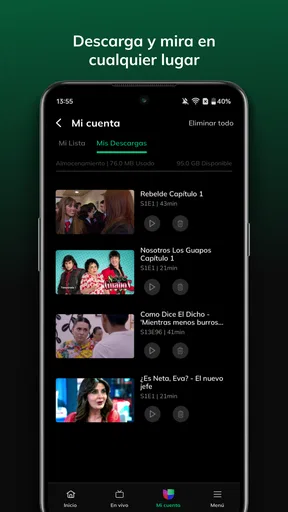
- Offline viewing for downloaded shows.
Cons
- Limited content available in English.
- Requires a subscription for full access.
- Occasional buffering issues reported.
- Not available outside the U.S.
- Ads present even with a subscription.
FAQs for Univision Now: Live TV
What is Univision Now: Live TV, and how does it work?
Univision Now: Live TV is a streaming service that allows users to watch live and on-demand content from Univision and UniMás channels. It provides access to popular shows, telenovelas, sports, and news in Spanish. The app can be accessed on various devices, including smartphones, tablets, and smart TVs, ensuring flexibility in viewing.
Does Univision Now offer a free trial or subscription options?
Yes, Univision Now typically offers a free trial for new users, allowing them to explore the content before committing to a subscription. After the trial period, users can choose from different subscription plans, often available on a monthly or annual basis. It's advisable to check the app or website for the latest subscription details and pricing.
Can I watch Univision Now content offline?
Currently, Univision Now does not support offline viewing. Content must be streamed using an internet connection. This means users need to be connected to Wi-Fi or a mobile data network to access live TV and on-demand content. Always ensure a stable internet connection for the best viewing experience.
What devices are compatible with Univision Now?
Univision Now is compatible with a wide range of devices, including iOS and Android smartphones and tablets, as well as smart TVs and streaming devices like Roku, Apple TV, and Amazon Fire TV. This ensures that users can enjoy their favorite Univision content on the device of their choice, providing great versatility.
Are there any geographical restrictions for using Univision Now?
Yes, Univision Now is primarily available to users within the United States. Due to licensing agreements and broadcasting rights, access may be restricted or unavailable in other regions. If traveling abroad, users might need to use a VPN service to access the content, but it's important to review the app's terms and conditions regarding this.


